Table of Content

What are ACES and PIES?
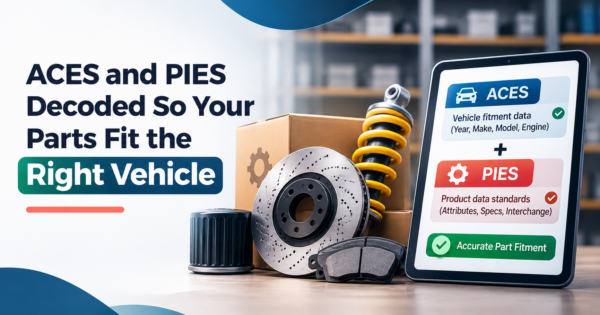
ACES (Aftermarket Catalog Exchange Standard) and PIES (Product Information Exchange Standard) are the Auto Care Association’s XML data standards for the automotive aftermarket. ACES carries fitment data, which vehicles a part fits. PIES carries product information, what the part is. Both are written with codes from shared reference databases, including VCdb for vehicles and PCdb for part types.
TL;DR
- ACES answers “which vehicles does this part fit?” and PIES answers “what is this part?” A parts listing that can be trusted needs both, tied to the same part.
- VCdb is the vehicle table that ACES data is written against, and PCdb is the part-type table that both ACES and PIES use. They are vocabularies, not catalogs, and neither says which part fits which vehicle.
- Per the Auto Care Association, ACES files need four reference databases (VCdb, Qdb, PCdb and the Brand Table) and PIES files need three (PAdb, PCdb and the Brand Table), all through an annual paid subscription.
- The current versions are ACES 5.0 and PIES 8.0, released April 2, 2026. The association supports only the current and previous versions, so check the version of every supplier file.
- Fitment damage often happens at import: vehicles stored as free text, dropped qualifiers, stale vehicle tables, mismatched part types and fitment files with no matching product records.
- The fix is routine: load the reference tables first, validate every file, match on codes instead of text and keep a person on the fitment sample before launch.
- If your supplier files need to land in a store with a working vehicle selector, our eCommerce developers and integration team build and test that import for parts sellers.
What do ACES and PIES stand for, and who maintains them?
ACES stands for Aftermarket Catalog Exchange Standard. The Auto Care Association describes ACES as the aftermarket industry data standard for managing and communicating product fitment data. PIES stands for Product Information Exchange Standard, and the association describes PIES as the standard for managing and communicating product information. The association maintains both, and publishes them on its standards page.
Both standards use a machine-readable XML format, so a supplier can send one file that every trading partner reads the same way. The association lists the benefits as less duplicated communication, lower supply chain costs, faster product introduction and fewer returns. It also states that ACES and PIES are communication standards, not an industry data pool, so every manufacturer and supplier produces its own files.
For a parts seller, the practical meaning is simple. ACES data tells your store which vehicle selector results a part belongs in. PIES data fills the product page once the shopper gets there. If either file is missing, wrong or loaded badly, the shopper sees the problem as a wrong part, a thin listing or a vehicle search that finds nothing.
How do ACES and PIES differ?
The two standards answer different questions about the same part, which is why parts sellers receive them as separate files.
| Standard | Question it answers | What it carries | Reference databases required |
|---|---|---|---|
| ACES | Which vehicles does this part fit? | Fitment: the vehicle configurations a part applies to, with the qualifiers that narrow it, for year, make and model lookups in a catalog or on the web | VCdb, Qdb, PCdb and the Brand Table |
| PIES | What is this part? | Features and benefits, marketing descriptions, pricing, warranty, product attributes and specifications, hazardous materials, kits, interchanges and digital assets | PAdb, PCdb and the Brand Table |
The right-hand column comes from the association’s subscriptions page, which also notes that PCdb and the Brand Table are shared by both standards. That overlap is useful. Because both files are written against the same part-type list, the part type in your fitment file and the part type in your product file can be compared directly.
What is VCdb and why does ACES depend on it?
VCdb is the Vehicle Configuration database. The association describes VCdb as a fully normalized, relational database used with ACES, and says it contains light, medium and heavy duty vehicles, powersports, off-highway and equipment configurations.
A relational vehicle table matters because a vehicle is more than a year, make and model. Engine, body style, drive type and other attributes decide whether a part fits, and VCdb gives each configuration a place in one structured list. ACES describes vehicles with codified values from the reference databases instead of typed text, so two suppliers who both sell a brake pad for the same truck describe that truck the same way.
VCdb lists vehicles. It does not list parts, and it says nothing about which part fits which vehicle. That link is the fitment data inside an ACES file, which comes from the manufacturer, a supplier or a fitment data provider. A store that buys a VCdb subscription and expects fitment to appear has bought the vocabulary, not the sentences.
The qualifiers that narrow a fitment live in the Qdb, the Qualifier database. The association describes it as holding coded fitment qualifiers, the standardized terms used in catalog and web lookups to find the right product for a vehicle, and lists more than 26,000 of them. Qualifiers cover the cases a vehicle attribute does not, so a note such as which position a part fits becomes a code instead of free text.
What is PCdb and what does it standardize?
PCdb is the Product Classification database. The association describes the PCdb as a product classification hierarchy that standardizes product terminologies in a coded manner, and lists more than 40,000 part terminologies, with examples such as Brake Pads, Spark Plugs and Headlight Bulbs.
Part names are the least consistent data in most supplier feeds. One supplier writes “Brake Pad Set,” another writes “Pads, Brake, Front,” and a third files the same item under a category of its own. A PCdb code replaces that with one entry that every ACES and PIES file can point to, so your store can group, filter and compare parts without a hand-built synonym list.
PCdb belongs to both standards, which is why a part type mismatch hurts twice. If the PIES file calls an item one part type and the ACES file calls it another, the product page and the vehicle selector disagree about what the part is.
What are PAdb, Qdb and the Brand Table?
Five reference databases support the two standards. The association’s databases page lists all of them, and a subscription bundles them by standard.
| Database | What it holds | Used with |
|---|---|---|
| VCdb | Vehicle configurations: light, medium and heavy duty vehicles, powersports, off-highway and equipment | ACES |
| PCdb | The coded hierarchy of part terminologies | ACES and PIES |
| Qdb | Coded fitment qualifiers used in catalog and web lookups | ACES |
| PAdb | Product-specific attributes, the specifications that describe a product, such as color, material and horsepower | PIES |
| Brand Table | The aftermarket brand identification database, with parent company names, brands and sub-brands stored as codes | ACES and PIES |
The association’s pages for PAdb and the Brand Table give the descriptions above. Brand codes matter more than they look. A fitment file and a product file only describe the same part if the brand and part number match exactly, so a brand spelled two ways in a supplier feed breaks the match before any fitment is read.
How do ACES, PIES, VCdb and PCdb fit together on one part?
Take a front brake pad set as an illustration. Nothing below comes from a real supplier file. It only shows which standard answers which question.
| What the shopper or your store needs to know | Where the answer lives |
|---|---|
| What kind of part is this? | A PCdb part type, referenced by both the PIES file and the ACES file |
| Who made it, and is that brand spelled consistently? | The Brand Table code that identifies the brand |
| What are its specifications, description and images? | The PIES file, with attribute names defined in PAdb |
| Which vehicles does it fit? | The ACES file, which points at vehicle configurations defined in VCdb |
| Does it fit only some versions, or only one position? | Qualifiers defined in Qdb, attached to the fitment in the ACES file |
| Do the product record and the fitment record describe the same part? | The brand and part number, which must match between the two files |
Read the table from the bottom. The last row is the one that fails quietly. When the part number differs by a dash or the brand is spelled differently, the import loads both files without an error and the part ends up with fitment and no content, or content and no fitment.
What does it cost to access the ACES and PIES databases?
The association states that ACES and PIES need an annual paid subscription to the reference databases. Its subscriptions page sets out which packages cover which standard. To create or receive ACES files you subscribe to one of the VCdb packages, which includes VCdb, Qdb, PCdb and the Brand Table. To create or receive PIES files you subscribe to PAdb, which includes PAdb, PCdb and the Brand Table. An entry-level package covers both standards for member companies under a stated revenue size.
Prices are tiered by company revenue and differ for members and non-members, so read the current figures on the association’s page instead of relying on any number quoted elsewhere. The point for planning is the shape of the cost. A seller who only receives supplier files still needs the databases that the files are written against, so build the subscription into the budget before you build the import.
Which versions of ACES and PIES are current?
The association’s announcement of April 2, 2026 released ACES 5.0 and PIES 8.0, with updated reference database schemas: VCdb 2.0, Qdb 2.0, PCdb 2.0, PAdb 5.0 and Brand Table 2.0. On its ACES and PIES pages, the association lists 4.2 and 7.2 as the previous versions and says it supports only the current and previous versions.
| Standard | What changed in the release |
|---|---|
| ACES 5.0 | Adds non-diagram digital asset support for vehicle-specific and part-specific assets inside the application segment, lets one digital asset carry multiple descriptions and broadens multilingual handling for the MfrLabel field |
| PIES 8.0 | Adds Extended Producer Responsibility packaging data for regulatory compliance, allows multiple package configurations at a single pack level and adds file hashing and record sequencing for digital assets |
These are the current versions as of November 25, 2026. Suppliers upgrade on different schedules, so a store will receive files in more than one version, and the importer has to read each one or reject it with a clear message.
What goes wrong when a store imports ACES and PIES data badly?
The damage happens in the step between the supplier file and the live vehicle selector. These are the common failure points, with the check that exposes each one.
| Failure | What the shopper sees | How to catch it |
|---|---|---|
| Vehicles stored as typed text instead of VCdb codes | Duplicate vehicle names, selector results that differ by spelling, parts missing for a vehicle that should match | Count distinct vehicle values after import; every one should map to a VCdb entry |
| A vehicle table loaded once and never refreshed | Newer vehicles missing from the selector or rejected on later fitment files | Log the VCdb version loaded, and reload on a schedule that matches the monthly and daily publication cycles |
| Qualifiers dropped on import | A part appears for every matching vehicle when it fits only one position or configuration, and returns follow | Compare the number of qualifier rows in the file with the number loaded |
| Part type taken from the supplier’s wording, not PCdb | Category pages and filters miss parts, and the same part sits in two categories | Check that every product and fitment row carries a valid PCdb code |
| Fitment loaded with no matching product record, or the reverse | A vehicle search that lists a part with no description, or a product page with no vehicle filter | Join the two files on brand and part number and list every row that fails to match |
| A file version the importer cannot read | Fields silently skipped, or the whole file rejected | Read the version from every file header and reject unsupported versions with a message |
The association says one goal of the standards is fewer returns, and these failures can lead to returns. Wrong-part returns can trace back to a lost qualifier or a vehicle matched on text. Before a file touches the live store, run it through a validator. The association notes in its release announcement that its free Catalog Assessment Reporting Tool on AutoCareVIP.com supports ACES 5.0 and PIES 8.0 files, and a hand check of the results should follow.
How do you load ACES and PIES data into a store without breaking fitment?
Work in an order that lets each step be checked before the next one depends on it.
- Inventory the files. List every supplier, the standard each sends, the version in each file header and how often it updates.
- License the reference databases. Match the subscription to the standards you receive, as described above, before you plan the import.
- Load the reference tables first. Store VCdb, PCdb, Qdb and the Brand Table as lookup tables in your own system, with the version and load date, so every later row can be checked against them.
- Import product data from PIES. Create or update product records, matching on brand and part number, and keep the PCdb code on each one.
- Import fitment from ACES. Write part-to-vehicle links and qualifiers into a fitment table keyed to the product, not into the product description.
- Run the validation gate. Reject rows with an unknown vehicle code, an unknown part type, a missing qualifier code or no matching product, and report them back to the supplier.
- Sample by hand. For each brand, check a set of parts on the vehicle selector and confirm they appear for the right vehicles and not the wrong ones. A person should sign off on fitment before it goes live.
- Schedule refreshes. Reload the reference tables on the publication cycle and reprocess supplier files on each update, logging what changed.
This is the same discipline we describe in our guide to product data management for auto parts, applied to the two standards. If you are moving a catalog onto a new platform at the same time, the data migration tools comparison covers the move itself.
On the Sugar Auto Parts marketplace, our team built import automation and a Year, Make and Model integration for part-to-vehicle matching, and the case study reports fewer upload errors and fewer returns as a result (self-reported results). For MaxTrac Suspension, the redesign added a vehicle selector so shoppers can narrow products by vehicle specifications.
What do ACES and PIES leave out?
PIES can carry pricing, but the standards are file formats for describing parts, not systems for running a store. Live stock, order status and the price a customer pays today live in your ERP and your inventory system, and they have to be synced with the catalog on their own schedule. Our guides to ecommerce ERP integration and ecommerce inventory management cover that side.
The standards also do not decide which parts you should sell, check a supplier’s fitment for accuracy or remove the need to review it. They make the data comparable. Whether it is correct is still a question for a person who knows the part.
When should you bring in a developer for ACES and PIES work?
A spreadsheet is enough for a small catalog from a few suppliers. Help pays off when you receive files from many suppliers in more than one version, when fitment has to drive a vehicle selector, or when the same catalog feeds several channels. Our eCommerce development services team builds the store side, including the fitment tables and selector, and our AI integration services team connects supplier feeds, validation and ERP sync across your systems. If you are comparing candidates, our list of questions to ask when you hire ecommerce developers for an auto parts store includes how they handle ACES and PIES.
Frequently Asked Questions
What is the difference between ACES and PIES?
ACES carries fitment data, which means which vehicles a part fits. PIES carries product information, which means what the part is: descriptions, attributes, pricing, warranty, kits, interchanges and digital assets. Both are XML standards from the Auto Care Association, and a complete listing for a parts store needs both, matched to the same part.
What is VCdb?
VCdb is the Vehicle Configuration database. The Auto Care Association describes it as a fully normalized, relational database used with ACES that contains light, medium and heavy duty vehicles, powersports, off-highway and equipment configurations. It is the list of vehicles that fitment data points to, so it describes vehicles, not parts.
What is PCdb?
PCdb is the Product Classification database, a coded hierarchy that standardizes product terminology. The association says it lists more than 40,000 part terminologies, such as Brake Pads and Spark Plugs, and that ACES and PIES both use it. It gives every trading partner one name for each type of part.
Do VCdb and PCdb tell me which parts fit which vehicles?
No. VCdb lists vehicles and PCdb lists part types. The link between a specific part and the vehicles it fits is fitment data, and that data comes from the manufacturer, a supplier or a fitment data provider, delivered in an ACES file. The reference databases only supply the standard vocabulary that file is written in.
Do I have to pay to use ACES and PIES?
According to the Auto Care Association, using the standards requires an annual paid subscription to the reference databases. Creating or receiving ACES files requires VCdb, Qdb, PCdb and the Brand Table, and creating or receiving PIES files requires PAdb, PCdb and the Brand Table. The association’s subscriptions page lists the packages, which are priced by company revenue, with member and non-member rates.
Which versions of ACES and PIES are current?
The Auto Care Association released ACES 5.0 and PIES 8.0 on April 2, 2026. Its ACES and PIES pages list 4.2 and 7.2 as the previous versions, and it states that it supports only the current and previous versions. Confirm the version of every supplier file before you import it, because your importer has to read that version.
How often are the reference databases updated?
The association’s VCdb and PCdb pages both list a monthly publication cycle for manual downloads and a daily cycle through an API. A store that loads the vehicle table once and never refreshes it will fall behind the vehicles that are added after the load.
Can I use ACES and PIES data in Shopify, WooCommerce or Magento?
The standards are XML files and do not belong to any platform, so any store can use the data if something reads the files and writes them into the store. The store needs a place to keep vehicles, part-to-vehicle links and qualifiers, and a vehicle selector that reads them. That is done with an app or a custom import, and either one should be tested on your own files before launch.
How do I check an ACES or PIES file before importing it?
Run the file through a validator and then check a sample by hand. The Auto Care Association says its free Catalog Assessment Reporting Tool on AutoCareVIP.com supports ACES 5.0 and PIES 8.0 files. After that, pick a handful of parts per brand and confirm on the live vehicle selector that each one appears for the right vehicles and none appear for the wrong ones.
Are ACES and PIES an industry data pool?
No. The Auto Care Association states that it provides data communication standards to the industry, not a shared pool of data. Each manufacturer or supplier creates its own ACES and PIES files, and each seller receives them from its trading partners.
Bottom Line
ACES tells a store which vehicles a part fits, PIES tells it what the part is, and the reference databases give both files one shared vocabulary. VCdb names the vehicles, PCdb names the part types, and neither supplies the fitment itself. Subscribe to the databases your files need, load the reference tables first, validate every file, match on codes instead of text and keep a person on the fitment sample. Done in that order, ACES and PIES data produces the one result a parts shopper cares about, the right part for the vehicle in the garage.