Table of Content

LangChain vs LangGraph: what is the difference?
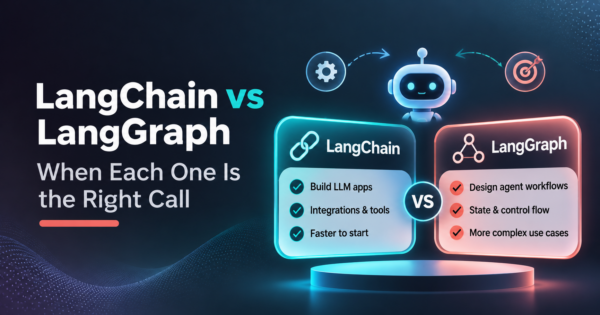
LangChain is the agent framework: it supplies models, tools and a ready-made agent loop through create_agent. LangGraph is the lower-level runtime beneath it, where you define state, steps and branches yourself. LangChain’s agents already run on LangGraph, so the real choice is how much control over state and flow you need.
TL;DR
- The two are layers, not rivals. LangChain’s documentation says its agents are built on top of LangGraph, and LangGraph’s documentation says it does not require LangChain.
- Start from the shape of the work. A known sequence of steps is a workflow. A task where the model decides its own next step is an agent. Many production systems mix both.
- If there is no loop and no saved state, you may need neither framework. A function that calls a model API can be the right answer.
- Use LangChain’s create_agent when a standard agent loop with tools fits. Reach for LangGraph directly when you need explicit control of state and flow, such as approvals, pause and resume, or parallel branches.
- Pausing for a person and resuming later depends on a checkpointer. An in-memory checkpointer loses everything on restart, so production needs a database-backed one.
- Both ecosystems point to LangSmith for tracing and evaluation. That is a product decision with its own cost, so check what you would own if you left it.
- This guide owns the framework choice. The guide to building an AI agent for your business owns the build steps, and the AI agent orchestration guide owns the wider orchestration question.
- Framework facts here come from the official LangChain documentation pages we opened on November 20, 2026. These libraries change quickly, so check the current docs before you commit.
Is LangChain based on LangGraph?
Yes, for agents. LangChain’s documentation states that its agents are built on top of LangGraph, which is how they get durable execution, human-in-the-loop support and persistence. The same page describes create_agent as the main entry point for building an agent, and calls it a minimal, highly configurable harness, meaning everything around the model loop such as the prompt, tools and middleware (LangChain documentation, overview page, read November 20, 2026).
LangGraph’s own overview describes it as a low-level orchestration framework and runtime for long-running, stateful agents, and says plainly that LangGraph does not require LangChain (LangGraph documentation, overview page, read November 20, 2026). Its examples often use LangChain for model and tool integrations, but the dependency is optional.
The documentation also names a third layer, Deep Agents, described as a batteries-included harness built on LangChain agents, with context compression, a virtual filesystem and subagents. So the stack reads like this: LangGraph is the runtime, LangChain agents sit on it, and Deep Agents sit on those. Choosing between LangChain and LangGraph is really choosing which layer you want to write code against.
What is the LangChain vs LangGraph decision really about?
The decision is about whether your work follows a fixed path or lets the model choose its own steps. LangGraph’s documentation draws that line: workflows follow predetermined code paths and run in a set order, while agents are dynamic and choose their own steps and tool use (LangGraph documentation, workflows and agents page, read November 20, 2026).
The same page lists the common patterns, and they are a better starting point than any feature table:
- Prompt chaining: each model call builds on the previous one, which suits tasks that split into checkable steps.
- Parallelization: several calls run at once on independent subtasks, or repeat the same task to compare answers.
- Routing: the input is classified first, then sent to a specialized path.
- Orchestrator-worker: one model splits the work, delegates it and combines the results, for subtasks that cannot be predefined.
- Evaluator-optimizer: one call generates, another evaluates, and the loop repeats until the result passes.
- Agent: a model uses tools in a continuous feedback loop, for problems where the path is unpredictable.
Write down which of these your task is before you pick a library. A support triage flow that classifies a ticket and routes it is a routing workflow. A research task that decides what to look up next is closer to an agent. Most business systems end up combining several patterns, which is the situation LangGraph’s documentation says it is for: combining deterministic steps with model-driven steps in one graph. For the business-side view of agents versus agentic systems, see our guide to AI agents vs agentic AI.
When is a plain model call or a simple chain enough?
A plain model call is enough when the task has one step, no loop and no state that must survive a restart. Summarizing a document, extracting fields from an invoice or classifying an email can often be one API call wrapped in ordinary code, with no agent framework at all.
This is our judgment, not a claim from the LangChain documentation, and it matters because frameworks add concepts you then have to learn, test and upgrade. Ask three questions before adding one. Does the system need to repeat steps until a condition is met? Does it need to remember something between runs? Does a person need to approve something partway through? If all three answers are no, start with the simplest code that works, and add a framework when a real requirement appears.
Some teams do not want to write code for automation at all. If your steps are mostly app-to-app connections with a model call in the middle, a workflow tool may fit better, and our AI workflow automation service and the comparison of AI agent builders cover that route.
When is LangChain’s create_agent enough?
create_agent is enough when a standard loop of a model calling tools covers the job. According to the documentation, you pass it a model, a list of tools and a system prompt, then invoke it on a list of messages, and you add capabilities such as guardrails, retries, routing and custom tool policies through middleware (LangChain documentation, overview page, read November 20, 2026).
Two more properties matter for a business build. The documentation says LangChain supports many model providers, including OpenAI, Anthropic and Google, and that its standard model interface lets you switch providers with minimal code changes. And because the agents run on LangGraph, you inherit its persistence and human-in-the-loop support without defining a graph yourself.
That makes create_agent the default for a first version of most tool-using assistants. You can always move down a layer later, since the layer beneath it is the one you would move to. The cost of starting high is mostly that you are using someone else’s loop, so you have less say over exactly how state moves between steps.
When do you need LangGraph directly?
You need LangGraph directly when you want explicit control over state and control flow. That is the documentation’s own guidance: use LangGraph when you need that control, and use Deep Agents or LangChain agents if you want a higher-level loop first (LangGraph documentation, overview page, read November 20, 2026).
In practice, these signals point to writing the graph yourself:
- The process has named stages and you must know which stage a run is in at any moment.
- Some steps must be deterministic code and others model-driven, in a fixed arrangement you want to see and test.
- A run can last hours or days, or must survive a crash and resume where it stopped.
- A person must review or approve before a risky action, such as sending money or changing a customer record.
- Several branches must run in parallel and their results be combined by rules you set.
The table lines up the three outcomes so you can see which row describes your project.
| Your situation | Likely fit | Why |
|---|---|---|
| One step, no loop, no saved state | Neither framework | A model API call and ordinary code is less to maintain |
| A model calling tools in a loop, standard behavior | LangChain create_agent | Ready loop, middleware, inherited persistence |
| Named stages, approvals, pause and resume, parallel branches | LangGraph directly | You define state, nodes and edges yourself |
| App-to-app steps with a model call in the middle | A workflow tool | Faster to build, less code to own |
How do persistence and human-in-the-loop work in LangGraph?
LangGraph saves graph state with checkpointers and resumes it later, which is what makes pausing for a person possible. A checkpointer stores state per thread, and a thread is identified by a thread_id passed in the configuration. The documentation also describes stores, which hold application data outside the graph state for long-term, cross-thread memory such as user preferences (LangGraph documentation, persistence page, read November 20, 2026).
The backend you choose decides what survives. The documentation lists an in-memory saver that keeps checkpoints in RAM, so they are lost on restart, a PostgreSQL-backed saver it calls a persistent checkpointer for production, and a SQLite saver described as local file-based storage suited to development. For a business system the practical rule is simple: if a run must outlive a deploy or a crash, use a database-backed checkpointer.
Human-in-the-loop builds on that. Calling interrupt() inside a node pauses the graph, surfaces a value to the caller and waits until you resume it, and you resume by invoking the graph again with a Command carrying the response on the same thread. The documentation says interrupts require a checkpointer (LangGraph documentation, interrupts page, read November 20, 2026).
One caveat from the same page is worth designing around. When a node resumes, it restarts from its beginning, so any code before the interrupt runs again. Keep that code safe to repeat, or place the interrupt early in the node. The documented approval pattern is to interrupt before a critical action, then route on the answer, proceeding on approval and canceling on rejection. For an approval step that touches money or customer data, that is the part of LangGraph most worth paying for.
How do you debug and deploy LangChain and LangGraph agents?
Both ecosystems point to LangSmith for visibility into what an agent did. LangChain’s documentation says LangSmith is used to trace, debug and evaluate agents built with any of its frameworks, and LangGraph’s overview says it helps you trace requests, evaluate outputs and monitor deployments. For deployment, the LangGraph overview describes the LangSmith Agent Server as a way to deploy and scale stateful agents, with a visual prototyping tool called Studio (documentation overview pages, read November 20, 2026).
LangSmith is a product from the same company, so treat it as a decision, not a default. We did not check its pricing, limits or data-residency terms for this guide. Before you commit, ask what traces contain, where they are stored, who can see them and what you would use instead if you left. You can run agents without it, but then you own the logging, evaluation and monitoring you would otherwise buy.
A practical test applies to any agent system, framework or not. Pick one failed run and try to reconstruct, from logs alone, which step ran, what the model saw and why it chose the next action. If you cannot do that, you cannot support the system in production. That requirement belongs in the project scope, and it affects the budget; our breakdown of AI agent development cost shows where it lands.
Do you need to learn LangChain before LangGraph?
No. LangGraph’s documentation states that it does not require LangChain, and its examples use LangChain mostly for model and tool integrations. You can learn the graph concepts of shared state, nodes and edges on their own, then add LangChain components where they save you work.
In reverse, if you start with LangChain’s create_agent you are already using LangGraph underneath, so you pick up its behavior without writing graphs. Which order is easier depends on your team. Engineers who want to see every step usually prefer to start with the graph. Teams that want a working agent this week usually start with create_agent.
Is LangGraph still relevant?
Yes, on the evidence available to us. LangChain’s agents run on it, as covered above, and the comparison itself is a steady search. In our Google Ads keyword data for the United States (pulled November 2026), searches for “langchain vs langgraph” rose from 2,900 a month in November 2025 to 4,400 in October 2026, and “langgraph vs langchain” ran at about 1,900 to 2,400 a month through mid-2026.
Interest in the bare term “langgraph” is large but past its peak: monthly searches were 40,500 in March and April 2026 and 22,200 in October 2026. A cooling headline term alongside a steady comparison search suggests people are past discovering the tool and are now choosing between layers, which is the decision this guide covers. Search volume says nothing about quality, so treat it as a sign of attention, not a recommendation.
What are the limits of LangGraph?
The main limit is that it is low level, which is also its point. LangGraph’s overview says it does not prescribe prompts or an agent architecture, so you design the state, the steps and the failure handling yourself. That is more work than create_agent and gives you more control.
Three practical limits follow from the documentation. State only persists if you configure a durable checkpointer. Resuming after an interrupt re-runs the node from the top. And observability and managed deployment lean on LangSmith, which is a separate product with its own terms. None of these is a reason to avoid LangGraph. They are reasons to scope the work honestly, including who will maintain the graph after launch.
What are the best AI agent frameworks besides LangGraph?
No single framework is best, because the right one depends on your workflow, your team and how much control you need. Searchers often compare CrewAI vs LangGraph, and LangChain vs LlamaIndex is another frequent pairing, but we did not read the documentation for those tools for this guide, so we are not ranking them here.
What we can say is how to compare any of them fairly. Test each against the same task. Check how it stores state, how it pauses for a person, how you trace a failed run and how often its interfaces change. Then compare the cost of owning it for a year, not the time to a first demo. Our reviews of AI agent builders and agent orchestration cover the wider field, and our comparison of MCP and APIs covers how agents connect to your tools. If you are comparing the best AI agent frameworks for a specific project, run a one-week test on a real task before you commit.
What goes wrong when a team picks the framework first?
The common failure is choosing a library before defining the workflow, then bending the workflow to fit it. The fix is to write the process on one page first: the steps, the decisions, where a person approves, what data each step needs and what “done” means. Then pick the layer that matches.
The second failure is version drift. These libraries move fast. Neither documentation page we read shows a library version or a publication date, and one third-party guide we read on November 20, 2026 (ByteAtlas, October 2026) warns that old tutorials import create_react_agent, which has been deprecated, and points to the v1 migration guidance. Treat any tutorial older than a few months as a hint, not a recipe, pin your dependency versions and re-read the current docs at each upgrade.
The third failure is skipping the human boundary. Decide in advance which actions an agent may take alone, which need approval and which it may never take. That decision is part of the design, not an add-on. It is also why many teams bring in a partner for the first build. Our guides to AI agent development companies and hiring AI developers cover how to choose one.
How do you choose in five questions?
Answer these in order and stop at the first row that applies.
- Is it one step? If a single model call with ordinary code does the job, use that and skip the framework.
- Is it app-to-app steps with a model call inside? Consider a workflow tool before writing code.
- Is it a model calling tools in a standard loop? Start with LangChain’s create_agent.
- Do you need named stages, approvals, pause and resume or parallel branches? Write the graph in LangGraph.
- Can you support it for a year? If nobody on your team will own the code, tracing and upgrades, decide who will before you build.
Here are three invented scenarios to show how the questions play out. They are illustrations, not client results. A support team wants incoming tickets classified and routed to the right queue: that is a routing workflow, so question one or three applies, and a full graph is probably more than it needs. A finance team wants an assistant that drafts a payment run and waits for a manager to approve it before anything is sent: that needs a pause, a saved state and a resume, so question four applies and LangGraph with a durable checkpointer is the natural fit. A founder wants a one-off tool that summarizes uploaded contracts: that is one model call plus code, so question one applies and neither framework is needed.
What should you ask a build partner about LangChain or LangGraph?
Ask the questions that expose who will carry the system after launch, because the framework matters less than the handover. These are the ones we would put in any statement of work:
- Which layer will you build on, and why is it the right one for our workflow and not just the one you know?
- Where is state stored, and what happens to an in-progress run if the system restarts?
- Which actions need human approval, and how is that approval recorded?
- How will we trace a failed run, and who pays for the tooling that does it?
- Who owns the code, the graph definitions and the accounts, and what documentation do we receive?
- How will you handle library upgrades, and who is responsible when an interface changes?
CommercePundit builds agent systems through our agentic AI development services and wider AI development services. If you want a second opinion on which layer fits your workflow, bring the one-page process description and the five answers above, and we will tell you where we would start and what we would leave out.
Frequently asked questions
What is the difference between LangChain and LangGraph?
LangChain is an agent framework with a ready-made agent loop, and LangGraph is the lower-level runtime that loop runs on. LangChain’s create_agent takes a model, tools and a prompt, and its documentation says those agents are built on LangGraph. LangGraph asks you to define state, nodes and edges yourself, which gives more control and takes more work.
Is LangChain based on LangGraph?
Yes, LangChain’s agents are built on top of LangGraph. LangChain’s documentation says this is where they get durable execution, human-in-the-loop support and persistence. The dependency does not run the other way, because LangGraph’s documentation says LangGraph does not require LangChain. The documentation also names a third layer, Deep Agents, built on LangChain agents.
When should you use LangChain vs LangGraph?
Use LangChain’s create_agent when a standard model-and-tools loop fits, and use LangGraph directly when you need explicit control over state and flow. Signals for LangGraph include named stages, approvals, pause and resume, long-running work and parallel branches. If the task is a single model call, you may need neither.
Do you need to learn LangChain before LangGraph?
No, LangGraph does not require LangChain according to its own documentation. You can learn LangGraph’s state, nodes and edges first and add LangChain components for model and tool integrations when they help. The better order depends on whether your team wants control first or a working agent first.
What is LangGraph used for?
LangGraph is used to build long-running, stateful agents and workflows with explicit control over state and flow. Its documentation lists durable execution, human-in-the-loop, memory and streaming among its capabilities. Typical uses include approval flows, multi-step tool use and processes that must resume after a failure.
Is LangGraph still relevant?
Yes, because LangChain’s own agents run on it and the comparison remains a steady search. Our keyword data shows searches for “langchain vs langgraph” rising from 2,900 a month in November 2025 to 4,400 in October 2026, while the bare term “langgraph” has cooled from its spring peak. Search volume shows attention, not quality.
What are the limits of LangGraph?
LangGraph is low level, so you design the state, steps and failure handling yourself. State persists only with a durable checkpointer, nodes re-run from the top after an interrupt, and managed tracing and deployment lean on LangSmith, a separate product. These are reasons to scope the work carefully, not reasons to avoid it.
Does human-in-the-loop need extra setup in LangGraph?
Yes, it needs a checkpointer and a thread_id. The documentation says interrupts require a checkpointer, and a durable one is recommended for production. You pause a node with interrupt() and resume the run with a Command on the same thread.
What are the alternatives to LangGraph?
Other agent frameworks exist, including CrewAI, and no single one is best for every project. We did not read their documentation for this guide, so we do not rank them. Compare any option on the same task, looking at state storage, pausing for approval, tracing a failed run and the cost of owning it for a year.
Bottom line
The choice between LangChain and LangGraph is a choice of layer, not of rival products. Define your workflow first, check whether you need a framework at all, use create_agent for a standard tool loop, and write the graph in LangGraph when state, approvals and resumption matter. If you want help deciding or building, talk to our team about agentic AI development.