Table of Content

What are examples of CRM?
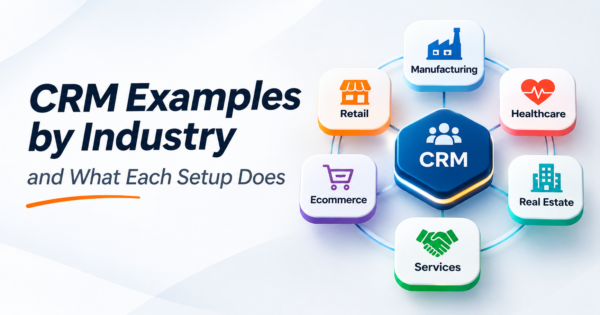
CRM (customer relationship management) examples fall into two groups: software, such as Salesforce, HubSpot, Zoho CRM, Pipedrive, Microsoft Dynamics 365 and Odoo CRM, and setups, meaning how a business configures any of them for its sales process. The same tool looks very different in real estate, B2B services, e-commerce or manufacturing, because the pipeline stages, fields, automations and reports change with the business. This guide shows eight industry setups, six tools and two worked numeric examples.
TL;DR
- A CRM stores who your customers are, every interaction with them and where each deal stands. The examples that help are setups, not logos: the stages, fields, automations and reports a business actually uses.
- There are four common types: operational, analytical, collaborative and campaign management. Most tools combine them.
- Eight industry setups below show the pipeline, the minimum fields, the automations worth building first and the report to watch. Each can be built in several CRM products.
- Two worked examples use computed numbers: a weighted sales forecast that drops by about a quarter when stale deals are removed, and a funnel where raising the contact rate from 70% to 80% adds about $30,000 in a quarter.
- A spreadsheet is a fine CRM until about the point shown in the threshold table. After that, shared access and automation matter more than price.
- All numbers in the worked examples are illustrations built for this guide, not benchmarks or client results. We name tools as examples without ranking them or quoting prices.
- CommercePundit configures and integrates CRM and ERP, including Odoo. See the last section.
What are the types of CRM?
| Type | What it does | Example use | Typical users |
|---|---|---|---|
| Operational | Automates sales, marketing and service tasks | Lead capture, follow-up reminders, ticket routing | Sales reps, support agents |
| Analytical | Turns customer data into reports and segments | Churn risk list, revenue by segment | Managers, analysts |
| Collaborative | Shares customer information across teams | Sales sees open support tickets before calling | Sales, support, account managers |
| Campaign management | Plans and measures outreach | Email sequence to a segment, tracked to deals | Marketing |
Most products blend all four. Our comparison of ERP and CRM explains where CRM stops and ERP begins.
Which CRM examples show how different industries set it up?
These are setup blueprints, not product reviews. Each lists what to track, the pipeline stages, the automations to build first and the report to watch. Any mainstream CRM can be configured this way.
| Industry | What it tracks | Pipeline stages | Automations to build first | Report to watch |
|---|---|---|---|---|
| Real estate | Contacts, properties, showings, lead source | New lead, contacted, showing booked, offer, under contract, closed | Instant lead reply; showing reminders; follow-up after 3 days of silence | Lead response time and showings per closed deal |
| B2B services or agency | Accounts, contacts, opportunities, proposals | Lead, discovery call, proposal, negotiation, won | Meeting booking link; proposal reminders at day 3 and 7 | Win rate by lead source and average sales cycle |
| E-commerce | Customers, orders, lifetime value, tags | Subscriber, first purchase, repeat buyer, VIP, lapsed | Post-purchase sequence; win-back at 90 days | Repeat purchase rate and revenue per segment |
| Manufacturing or distribution | Accounts, buyers, quotes, price lists, contracts | Inquiry, quote sent, sample or trial, order, repeat | Quote expiry reminders; reorder prompts | Quote-to-order rate and reorder gaps |
| Healthcare practice | Patients, referrers, appointments, consent flags | Inquiry, booked, seen, follow-up due | Appointment reminders; recall for annual visits | No-show rate and recall completion |
| Nonprofit | Donors, gifts, campaigns, volunteers | Prospect, first gift, repeat donor, major donor | Thank-you within 24 hours; lapse alert | Donor retention rate |
| Construction | Owners, GCs, bids, projects, bonding info | Bid invited, bid submitted, awarded, kickoff | Bid due-date reminders; post-award handoff to project | Hit rate on bids and backlog by customer |
| Software as a service | Accounts, users, trials, plans, usage | Trial, activated, paid, expansion, renewal | Trial nurture; renewal alerts at 90 days | Trial-to-paid conversion and net revenue retention |
Construction and manufacturing firms often need the CRM to share data with the ERP so a won bid or order becomes a job or a sales order without retyping. See our guides to CRM and ERP integration and ERP system examples.
Which CRM system examples do businesses actually use?
| Tool | Often chosen by | Typical strengths | Check before you buy |
|---|---|---|---|
| Salesforce | Larger or complex sales organizations | Deep customization and a large partner ecosystem | Admin skill and total cost of ownership |
| HubSpot | Small and mid-size teams that want marketing and sales together | Easy start, marketing automation, one interface | How costs change as contacts and users grow |
| Zoho CRM | Cost-conscious small and mid-size businesses | Broad suite of connected apps | Depth of the features you need |
| Pipedrive | Small sales teams focused on the pipeline | Simple pipeline view | Reporting and marketing depth |
| Microsoft Dynamics 365 | Organizations on Microsoft | Fit with Microsoft apps and data | Implementation effort |
| Odoo CRM | Businesses that want CRM inside an ERP suite | CRM, sales, inventory and accounting on one database | Partner skill and customization needs |
The list is examples, not a ranking, and features and plans change, so confirm current details with each vendor. For a longer comparison see our best CRM software comparison. If you run Odoo, our Odoo development services team sets up CRM inside the suite.
How do businesses use a CRM day to day?
- Capture leads from forms, email, calls and events in one place.
- Assign each lead to an owner and remind that owner when no one has replied.
- Move deals through stages so everyone sees where each one stands.
- Log calls, emails and meetings so history survives staff changes.
- Send reminders for follow-ups, renewals and appointments.
- Build quotes and proposals from the same customer record.
- Segment customers for campaigns and track which campaigns produce deals.
- Route support requests and show open tickets to the account owner.
- Forecast revenue from weighted pipeline.
- Report on win rate, sales cycle and lead source performance.
- Hand a won deal to delivery or finance without retyping.
- Keep consent and communication preferences in one record.
Worked example: why a CRM forecast needs clean data
A weighted pipeline multiplies each deal’s value by the probability of its stage. The figures are invented. The table also removes deals with no activity in 90 days.
| Stage | Deals | Average value | Stage probability | Weighted value | Stale deals (no activity in 90 days) | Weighted value without stale deals |
|---|---|---|---|---|---|---|
| New lead | 120 | $4,000 | 5% | $24,000 | 40 | $16,000 |
| Qualified | 60 | $6,000 | 15% | $54,000 | 20 | $36,000 |
| Proposal | 25 | $9,000 | 35% | $78,750 | 8 | $53,550 |
| Negotiation | 10 | $12,000 | 60% | $72,000 | 1 | $64,800 |
| Total | $228,750 | $170,350 |
The raw forecast is $228,750. Without stale deals it is $170,350, a drop of 26%. Stale deals are not worthless, but they are not 5% or 35% likely either. A CRM that nobody updates produces a confident forecast that is wrong. The fix is process, not software: require a next step and a date on every open deal, and review any deal without activity for 30 days.
Worked example: what a better contact rate is worth
Suppose 1,000 leads arrive in a quarter. 70% are contacted, 40% of those qualify, 40% of qualified leads get a proposal and 25% of proposals are won, at an average deal of $7,500. A CRM with instant lead assignment and reminders raises the contact rate to 80%. Everything else stays the same.
| Funnel step | Contact rate 70% | Contact rate 80% |
|---|---|---|
| Leads | 1000 | 1000 |
| Contacted | 700 | 800 |
| Qualified | 280 | 320 |
| Proposals | 112 | 128 |
| Deals won | 28 | 32 |
| Revenue | $210,000 | $240,000 |
That is $30,000 more in a quarter from one change at the top of the funnel. The point is where to look first: the stage with the biggest drop is usually a process gap, such as slow replies or missing reminders, that a CRM can close without any new leads.
What is the minimum set of CRM fields?
| Record | Fields to start with | Why |
|---|---|---|
| Contact | Name, email, phone, company, role, owner, source, consent status | Who they are and who owns the relationship |
| Company | Name, industry, size, website, owner | Roll up contacts and deals |
| Deal | Name, value, stage, expected close date, next step, next step date, owner, lost reason | Forecast and discipline |
| Activity | Type, date, summary, linked contact and deal | History that outlives staff changes |
| Source | Campaign or channel, first touch date | Which channels produce deals |
Resist adding fifty custom fields on day one. Every field someone has to fill in is a chance for the data to rot. Add a field only when a report or automation needs it.
Is Excel a CRM?
| Signal | A spreadsheet is fine | Move to a CRM |
|---|---|---|
| Number of people updating | 1 or 2 | 3 or more at the same time |
| Open deals or contacts | Under about 100 | Several hundred and growing |
| Follow-up | Done by memory | Missed follow-ups cost deals |
| Reporting | A monthly summary by hand | Forecast and win rate needed weekly |
| History | One owner holds it | Staff turnover loses the context |
| Integration | None needed | Quotes, invoices or email must connect |
The thresholds are rules of thumb. The real trigger is when shared access and reminders matter more than saving the subscription fee.
How do you set up a CRM in 30 days?
| Week | Do this | Done when |
|---|---|---|
| 1 | Write your pipeline stages in plain words and agree what moves a deal from one to the next | Stages and exit rules are written down |
| 2 | Clean and import contacts and companies; remove duplicates | One record per person and company |
| 3 | Build the three automations that matter most: lead assignment, follow-up reminders and stage alerts | Every new lead has an owner within minutes |
| 4 | Build the pipeline and source reports; train the team; stop using the old spreadsheet | The weekly meeting runs from the CRM |
Where does AI help in a CRM?
- Summaries. Turn a long email thread or call into a short note and next step. A person confirms it.
- Drafts. First drafts of follow-up emails from deal context.
- Data hygiene. Flag duplicates, missing fields and deals with no activity.
- Scoring. Rank leads by past wins, but only after you have a few hundred outcomes to learn from.
AI makes a clean CRM faster and a messy one messier. Our AI integration services connect assistants to CRM records with review steps, and our customer data platform work unifies customer data across systems. Our guide to sales dashboard examples shows how to report on the result.
What mistakes make CRM projects fail?
| Mistake | What happens | Fix |
|---|---|---|
| Buying before defining the process | The tool shapes the process by accident | Write stages and rules first |
| Too many required fields | Reps skip updates or enter junk | Require only what reports need |
| No owner for data quality | Duplicates and stale deals pile up | Assign an owner and a monthly cleanup |
| Importing a dirty list | The new CRM starts messy | Deduplicate before import |
| No link to billing or delivery | Won deals are retyped | Connect CRM to ERP or accounting |
| Skipping adoption | Reps keep their own spreadsheets | Run the weekly meeting from the CRM |
Frequently Asked Questions
What are examples of CRM?
Examples include CRM software such as Salesforce, HubSpot, Zoho CRM, Pipedrive, Microsoft Dynamics 365 and Odoo CRM, and CRM setups, such as a real estate pipeline from lead to closing, a B2B services pipeline from discovery call to proposal, or an e-commerce segmentation by purchase history.
What are the four types of CRM?
Operational CRM automates sales, marketing and service tasks. Analytical CRM turns customer data into reports and segments. Collaborative CRM shares customer information across teams. Campaign management CRM plans and measures outreach. Most products combine them.
How do businesses use CRM?
They capture leads, assign owners, move deals through stages, log interactions, send reminders, build quotes, segment customers for campaigns, route support requests, forecast revenue and report on win rate and sales cycle.
Is Excel a CRM system?
A spreadsheet can work as a simple CRM for one or two people with a small number of contacts. It struggles with shared updates, reminders, history and reporting, which is when a real CRM is worth the cost.
Can ChatGPT make a CRM?
It can help you design fields and stages or draft a prototype, but a production CRM needs secure access control, backups, integrations, an audit trail and reliable automation. Treat generated designs as a starting point and have the build reviewed.
What is the difference between CRM and ERP?
CRM manages customer relationships and the sales pipeline. ERP manages operations such as finance, inventory, purchasing and production. Many businesses connect the two so a won deal becomes an order or a job without retyping.
What CRM is best for small business?
It depends on your process, team size and other tools. Pick the stages and reports you need first, then trial two or three products with a real month of data before you decide.
How much does a CRM cost?
Pricing varies by vendor, plan, users and add-ons, and it changes often. Model the subscription together with setup, data cleanup, integrations, training and administration.
How do I choose a CRM?
Write your pipeline stages and reports, list the systems it must connect to, shortlist two or three tools, and run each on a real month of leads. Choose the one your team will actually update.
Bottom Line
The best CRM examples are setups: clear stages, few fields, the right automations and one report people read every week. Define the process before you pick software, keep the data clean and connect the CRM to the systems that deliver and bill. If you want a CRM configured and integrated with your ERP, talk to us about our Odoo development services or our integration team.